
How WhatsApp Works Without Internet: Offline Messaging and Sync Explained
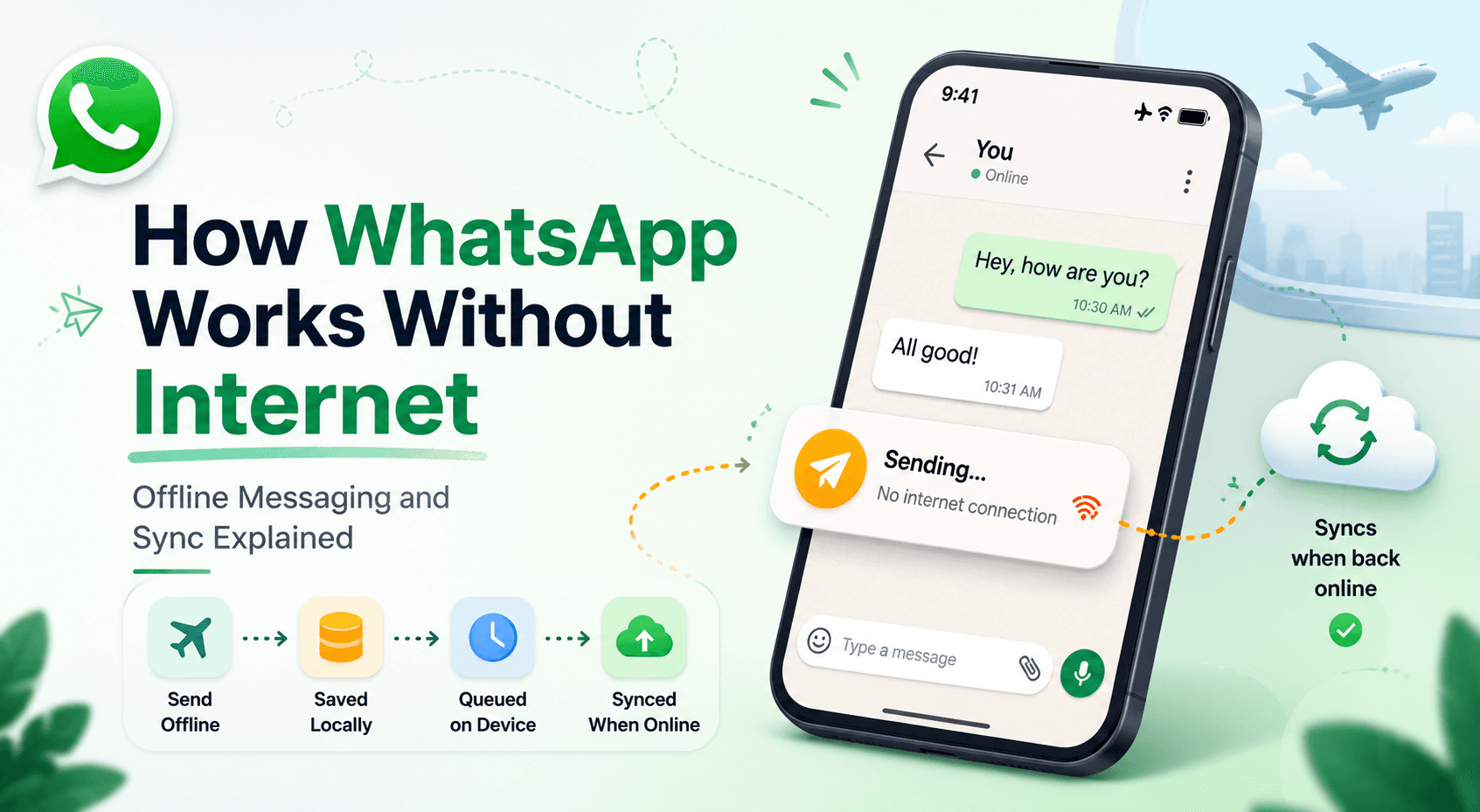
Have you ever typed out a message in WhatsApp while your phone was in airplane mode, hit send, and watched it appear instantly in the chat? It feels like magic—but there's no internet connection at all. So how does the message show up? And what happens to it when you finally reconnect?
In this blog, we'll break down how messaging apps like WhatsApp handle offline scenarios. We'll explore what happens behind the scenes when you send a message without internet, how the app stores and syncs your data, and why this kind of design makes apps feel fast and reliable. Let's dive in.
Why Messaging Apps Need Offline Support
Imagine if WhatsApp only worked when you had a perfect internet connection. Every time you walked into an elevator, entered a tunnel, or had spotty network, the app would freeze or refuse to let you type. That would be a terrible experience.
The reality is that internet connectivity is unreliable. Networks drop, signals weaken, and people travel through dead zones. A good messaging app must continue to feel responsive even when the connection is poor or completely gone.
This is where the idea of offline support comes in. The app is designed to keep working from the user's point of view, even when it can't immediately talk to the server. This approach is often called offline-first architecture, and it's the foundation of how WhatsApp feels so smooth.
A Simple Scenario: Sending a Message in Airplane Mode
Let's start with a concrete example. You turn on airplane mode, open a chat, type "Hey, are we still meeting?" and tap send.
Here's what you observe:
The message appears in the chat instantly.
It shows a single clock icon (pending) instead of the usual checkmarks.
What actually happened is that the app did not send the message to the server—because it couldn't. Instead, it saved the message locally on your device and showed it to you immediately. To you, it looks like the message was sent. But in reality, it's just waiting.
This trick—showing the message right away even though it hasn't been delivered—is the heart of offline messaging.
Local Storage and Message Persistence
For this to work, the app needs a place to store messages on your phone. This is called local storage.
WhatsApp keeps a small database directly on your device (using technologies like SQLite). Every message you send or receive is written into this local database first. This is why:
Your chats load instantly when you open the app.
You can scroll through old conversations even without internet.
A pending message isn't lost if you close the app.
This concept is called message persistence—your data "persists" (stays saved) even if the app closes, the phone restarts, or the network never comes back for hours.
So the rule is simple: save first, sync later. The app writes the message locally, then worries about sending it to the server afterward.
Message Queueing on the Device
When you send a message offline, it goes into something called a message queue. Think of a queue like a line of people waiting their turn.
Each message you send while offline gets added to this queue in the order you sent them. The app keeps this list of pending actions—messages that still need to be delivered to the server.
For example, if you send three messages in airplane mode:
"Hey"
"Are you free?"
"Let's meet at 5"
All three are stored locally and lined up in the queue, marked as "not yet sent." The app remembers their order so that when the internet returns, it can send them correctly.
This queue isn't just for text. It can hold many types of pending actions, like marking a message as read, deleting a message, or uploading media.
Syncing Messages When Connectivity Returns
Now you turn off airplane mode. The phone reconnects to the internet. What happens?
The app detects that connectivity is back and starts syncing. Syncing means making your local data and the server's data match each other.
Here's the typical sequence:
The app looks at its queue of pending messages.
It sends each message to the server, one by one, in order.
The server receives them and forwards them to the recipient.
The server sends back confirmations.
The app updates the message status (the checkmarks change).
At the same time, the app also downloads any messages that were sent to you while you were offline. So syncing works in both directions—pushing your pending messages out and pulling new messages in.
This whole process usually happens within seconds, which is why messages "catch up" almost immediately when you reconnect.
Delivery States: Sent, Delivered, Read
WhatsApp shows you the journey of each message using simple icons. These are called delivery states, and they tell you exactly where your message is.
Pending (clock icon): The message is saved on your device but hasn't reached the server yet. This is what you see when offline.
Sent (one gray check): The message has successfully reached the WhatsApp server.
Delivered (two gray checks): The server has delivered the message to the recipient's device. Note: this doesn't mean they read it—just that it arrived on their phone.
Read (two blue checks): The recipient actually opened the chat and saw the message.
These states give users feedback and confidence. Even if a message is stuck as "pending," you know it's safely saved and will be sent when possible. This transparency is a big part of good user experience.
Handling Media Uploads While Offline
Text messages are small and easy to queue. But what about photos, videos, and voice notes?
Media files are large, so they need extra care. When you try to send a photo offline:
The photo is stored locally and shown in the chat right away.
An upload task is added to the queue.
When the internet returns, the app uploads the file to the server.
Once uploaded, the message link is sent to the recipient, who can then download it.
Because media uploads can fail partway (especially on weak networks), apps often support resuming uploads instead of starting over. This saves data and time. The key idea is the same: store locally first, then upload when the network allows.
Conflict Resolution and Message Ordering
When messages are sent and received from multiple devices and stored on a server, things can get messy. What if two messages arrive at almost the same time? How does everyone agree on the correct order?
This is where message ordering and conflict resolution come in.
To keep order consistent, messages are usually tagged with timestamps and sometimes sequence numbers. The server uses these to arrange messages in the right sequence so that everyone sees the conversation in the same order.
Conflicts can happen, for example, if you're using WhatsApp on your phone and laptop at once. The system has rules to merge everything sensibly so you don't end up with duplicate or out-of-order messages. The goal is that all your devices eventually show the same final state.
Eventual Consistency Made Simple
This brings us to an important idea: eventual consistency.
In a perfect world, every device would have the exact same data at the exact same moment. But that's impossible when devices go offline. Instead, messaging apps aim for eventual consistency—meaning that eventually, once everyone is connected and synced, all devices will agree on the same set of messages.
There might be a short delay where your phone has a message your laptop doesn't yet have. That's okay. The system works in the background until everything matches up. Beginners can think of it like this: "Maybe not the same right now, but the same soon."
Reliability vs. Realtime Delivery: The Tradeoff
There's an important tradeoff in designing these systems: reliability versus realtime delivery.
Realtime delivery means messages arrive the instant they're sent.
Reliability means messages are never lost, even if delivery is delayed.
You can't always have both perfectly. WhatsApp leans toward reliability—it would rather delay a message and guarantee it eventually arrives than risk losing it. This is why your offline messages wait patiently in a queue instead of disappearing.
By storing messages locally first, the app guarantees nothing is lost, while still feeling real-time because messages appear on your screen instantly.
How Offline-First Architecture Improves Usability
Let's tie it all together. The offline-first approach gives users a smooth experience because:
Messages appear instantly, with no waiting for the network.
Chats load fast since data lives on the device.
Nothing is lost when the connection drops.
The app works in elevators, tunnels, planes, and weak-signal areas.
Users always get clear feedback through delivery states.
By thinking "local first, sync later," developers build apps that feel fast and trustworthy. That's the real secret behind how WhatsApp seems to work even without the internet.
Summary
Messaging apps need offline support because internet connectivity is unreliable.
Messages are saved locally first, then synced to the server later.
Offline messages go into a queue of pending actions in order.
Syncing pushes your messages out and pulls new ones in when connectivity returns.
Delivery states (pending → sent → delivered → read) keep users informed.
Media uploads are queued and uploaded later, with resume support.
Timestamps and conflict resolution keep message order consistent.
Eventual consistency means all devices agree on the data eventually.
The system favors reliability over instant delivery to avoid losing messages.
This offline-first design is what makes the app feel fast and dependable.
Next time you send a message in airplane mode and watch it appear instantly, you'll know exactly what's happening behind the scenes!