Sessions vs JWT vs Cookies: Understanding Authentication Approaches
Modern web applications must know “who” is using them. They need to recognize if a request comes from a logged-in user, and often keep this information for multiple requests or page loads. There are several popular methods to manage authentication and user state, each with its own trade-offs in security, scalability, and developer experience.
This article will break down the three most popular concepts—Sessions, Cookies, and JWT (JSON Web Token)—and show how they fit together in real-world authentication.
What Are Sessions?
A session is a way for the server to remember details about a user across multiple requests.
When a user logs in, the server creates a session object (e.g.
{ userId: 42, role: "admin" }).This session is saved on the server (in-memory, database, or other storage).
The server generates a unique session ID (like
abc123).This session ID is sent to the client—usually as a small cookie.
For each new request, the client sends back the session ID.
The server finds the session by ID and “remembers” the user for that request.
Key idea:
The server holds the user state (“session”) and uses the session ID to look it up.
If the server loses the session store, all users are logged out.
What Are Cookies?
A cookie is a small piece of data stored on the client’s browser and sent automatically with each HTTP request to the same server.
Cookies are:
Key/value pairs (like
sessionId=abc123)Sent in HTTP headers (
Cookieheader)Can store any small data, but often just a short identifier
Cookies are used in:
Session-based authentication (to store the session ID)
Remember-me features
Tracking preferences
Important:
Cookies do not do authentication by themselves—they are a storage/delivery mechanism.
It’s what you put in the cookie and how you use it that determines the authentication approach!
What Are JWT Tokens?
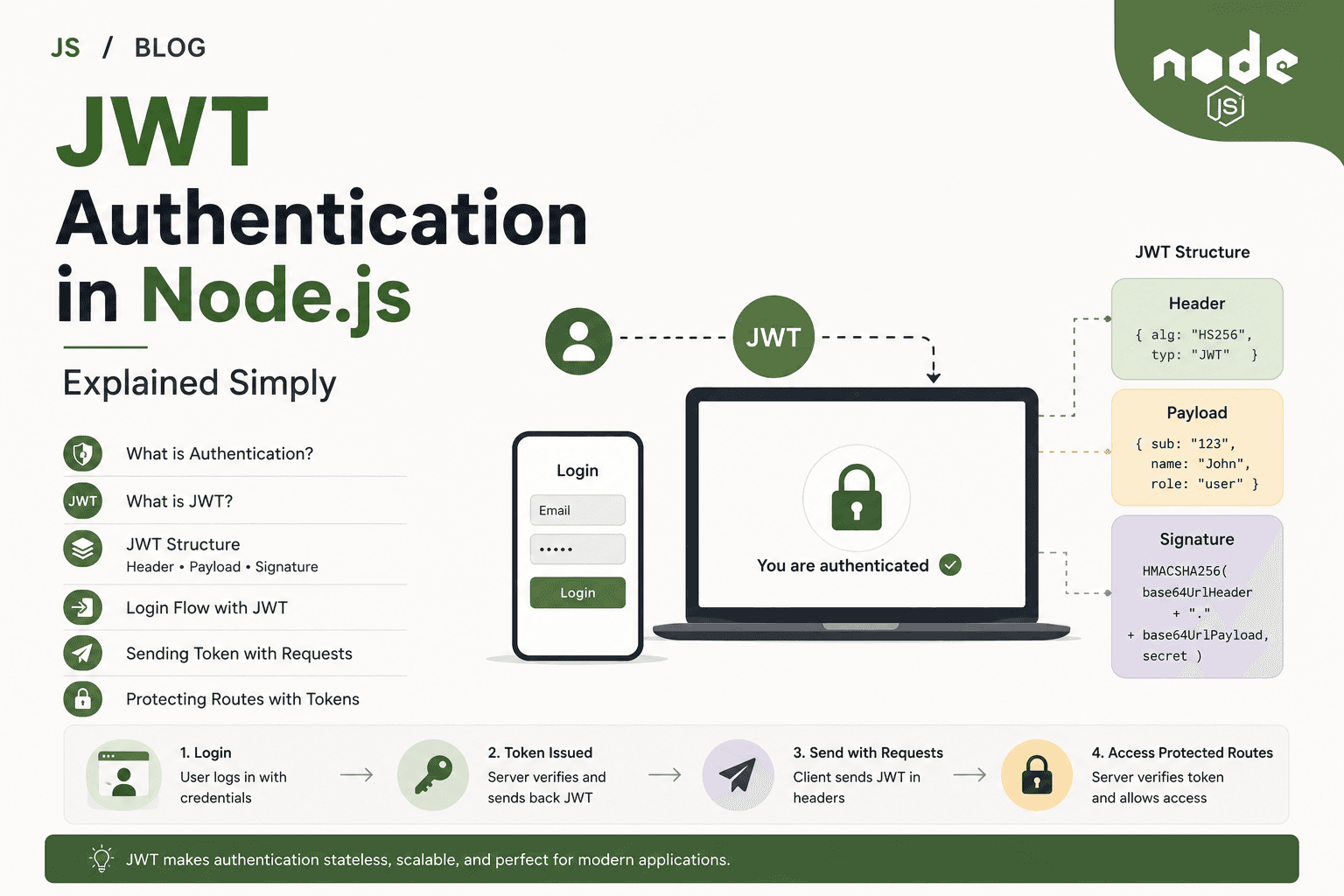
A JWT (JSON Web Token) is a self-contained piece of information, digitally signed, often used to prove a user’s identity.
JWTs are generated on the server at login and include encoded user info (e.g.
{ id: 42, role: "admin" }).They are signed, so the server can verify they haven’t been tampered with.
The token itself is typically stored on the client—in a cookie, localStorage, or memory.
On every request, the JWT is sent (usually in an
AuthorizationHTTP header).The server verifies the signature and reads user info, without looking anything up in a session store.
Key idea:
JWTs carry their own “proof” of identity.
The server does not need to track sessions for each client.
Stateful vs Stateless Authentication
These techniques differ in how and where the user’s authenticated state is stored.
| Approach | Where is state? | Typical Example |
|---|---|---|
| Sessions | On server (“stateful”) | Session object in memory/database, session ID in client cookie |
| JWT tokens | On client (“stateless”) | Signed JWT sent with each HTTP request, no central session store |
Stateful means the server must remember the user info between requests—if the server restarts or doesn’t share the session store, users must log in again.
Stateless means each token holds everything needed—servers don’t need to coordinate or remember each user.
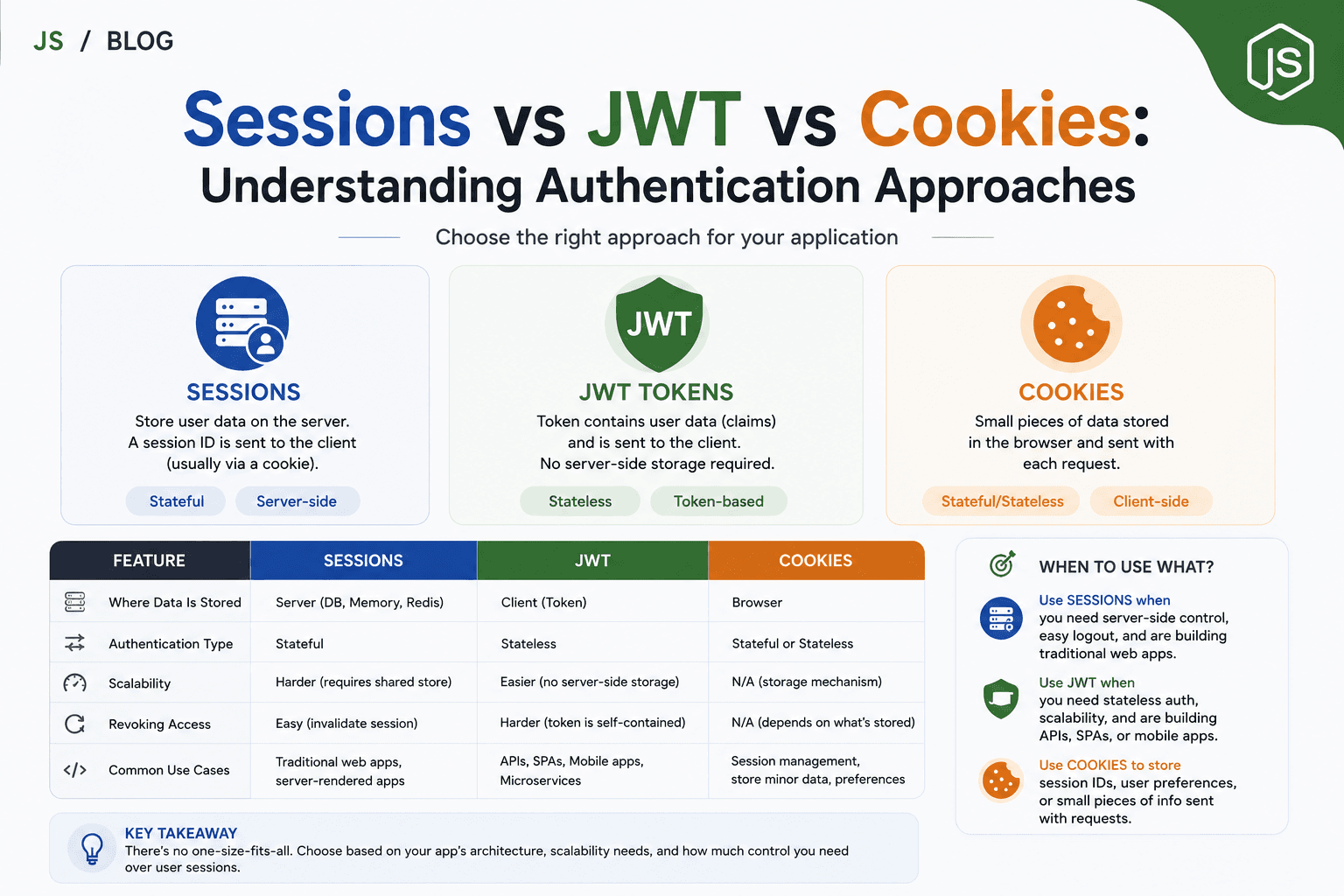
Differences Between Sessions, JWT, and Cookies
Let’s compare how these approaches work in practice.
| Feature | Session-Based Auth | JWT Auth | Cookies |
|---|---|---|---|
| State Location | Server (memory/DB/cache) | Client (token) | Client (browser) |
| What’s Stored Client-Side | Session ID | JWT itself (with user info/signature) | ID, JWT, or other small data |
| Server Storage Needed | Yes | No (stateless) | No (it’s just client data) |
| Scaling Servers | Requires shared/session store | Easier (any server can verify) | Neutral |
| Revocation / Logout | Easy (delete session) | Harder (tokens remain valid) | Delete/expire cookie |
| Security Control | Full control by server | Token limited after issuance | Cookie flags (HttpOnly, Secure) matter |
| Expiry | Set on server/configurable | Set inside token | Set when cookie created |
| Mobile-Friendly | Not ideal (needs cookies) | Yes (send token in header) | Not on native mobile apps |
| Fits API-First Apps | Needs more handling | Best fit | Only as storage mechanism |
Real-World Example: User Login Flow
Using sessions with cookies (traditional web apps):
User logs in, server creates session
{ userId: 42 }in memory or DB.Server sets a cookie:
Set-Cookie: sessionId=abc123.Browser stores
sessionIdand automatically sends it with every request.Server finds session by ID on each request and “remembers” the user.
Using JWT tokens (common for APIs and SPAs/mobile apps):
User logs in, server creates a JWT containing user info, signs it.
Server returns token to client (as cookie, header, or localStorage).
Client includes token with every request (e.g. as
Authorization: Bearer <token>).Server checks signature and reads user info from token—no session needed.
Where do cookies fit?
They can carry either a session ID or the JWT!
Key is how you use them.
When to Use Each Authentication Method
Session-Based
Best for classic, server-rendered web apps where browsers are the main clients
Easier to forcibly expire or revoke sessions (like after a password change)
Naturally CSRF-protected in some setups (if using HttpOnly cookies)
Scaling requires session sharing between servers (e.g. Redis, database)
JWT-Based
Best for APIs and SPAs where the frontend and backend are separate
No need to store authentication state on the server for each client
Clients (browsers, mobile apps, other services) can store and send the token
Fits microservices and horizontal scaling naturally
Make sure to handle issues with long-lived tokens (manual revocation is harder)
Cookies
Universal delivery mechanism for small pieces of data
Use for sessions (traditional), JWTs (if desired), or short-term state
Security depends on
HttpOnlyandSecureflags
Practical Use Cases
| Scenario | Best Approach |
|---|---|
| Classic websites with user login/logout | Sessions w/ cookies |
| Modern REST APIs (for SPAs/mobile apps) | JWT tokens |
| Single sign-on or stateless microservices | JWT tokens |
| Need to force-logout users in real-time | Sessions |
| Secure browser-to-server (no API use) | Sessions or JWT in cookies (with security flags) |
Frequently Asked Questions
Q: Is a cookie an authentication method?
A: No—it’s a storage and delivery tool. Authentication is about how you manage and validate user state (sessions/JWT), cookies just carry the data.
Q: Can I store JWTs in cookies?
A: Yes. You can keep JWTs in cookies OR anywhere else (localStorage, memory), but cookies make them work automatically with browsers.
Q: Is JWT more secure than sessions?
A: Not inherently. Security depends on implementation. JWTs are more convenient for stateless/mobile/API contexts, but revocation and management need careful planning.
Q: Can I use both at the same time?
A: Sometimes, yes. For example, JWT for APIs, and server-side sessions for web dashboard/admin.
Conclusion
Sessions mean the server “remembers” you with a session ID, usually sent via cookies.
JWT tokens are self-contained, signed tokens that let any server validate and “remember” the user without storing a session.
Cookies transport data (like session IDs or JWTs) back and forth between client and server, but do not provide authentication on their own.
Session-based authentication is stateful (relies on server memory), while JWT is typically stateless (the client holds authentication data).
Choose the method that best fits your app’s needs: sessions for traditional sites, JWT for distributed APIs, cookies as a flexible delivery tool for web browsers.
Understanding these differences helps you design secure, scalable, and maintainable authentication systems for your Node.js and Express applications.