Async Code in Node.js: Callbacks and Promises
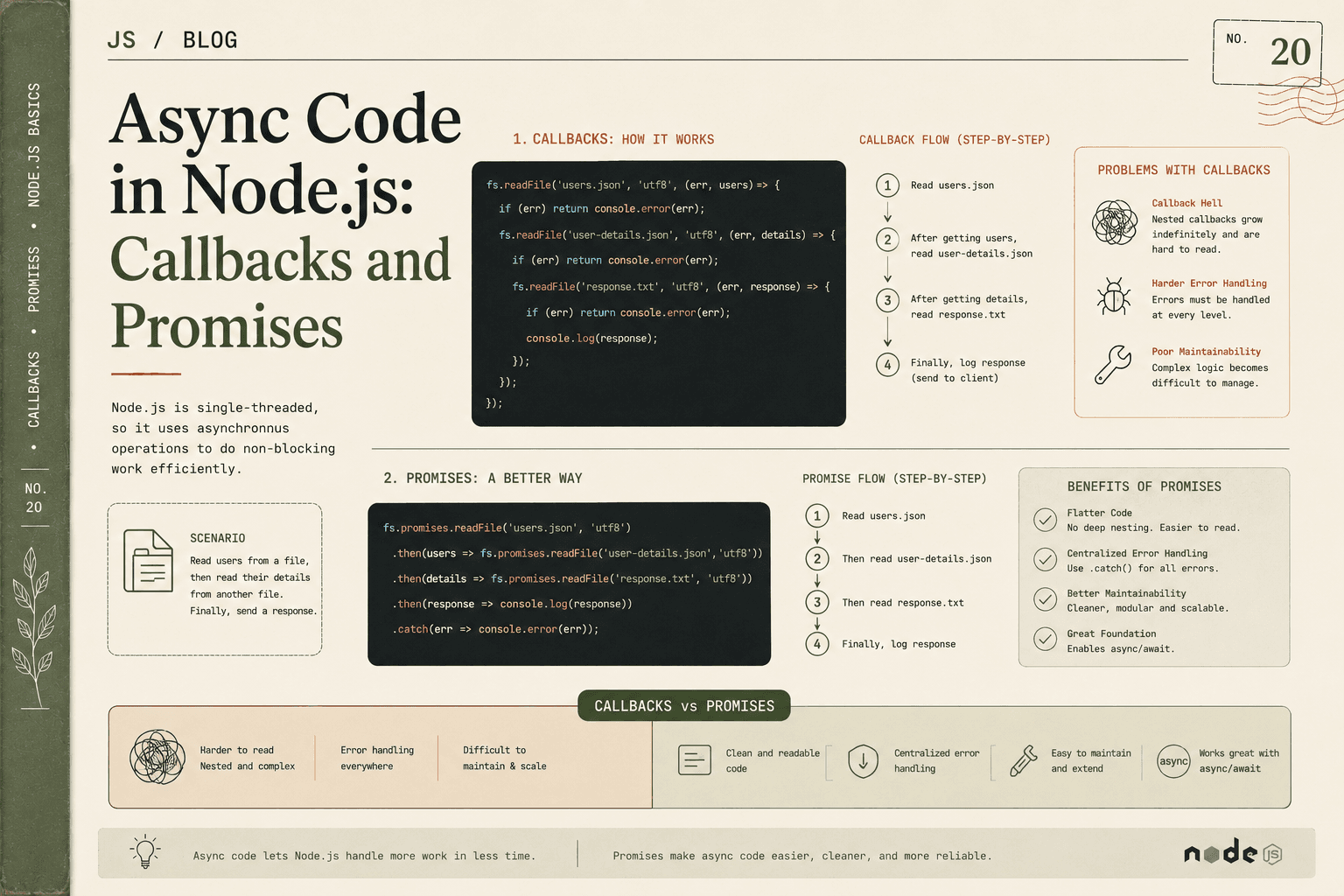
Node.js is famous for its ability to handle many tasks at once without getting overwhelmed. This comes from its focus on asynchronous (async) code—the ability to start a task, keep the system moving, and handle results when they’re ready.
Why is this important? In server code, many operations take time—reading files, fetching database data, or responding to network requests. If Node.js waited for each one to finish before doing anything else (blocking behavior), performance would drop dramatically.
Let’s explore how Node.js handles async code with callbacks and promises.
Why Async Code Exists in Node.js
Node.js is single-threaded. It can only run one piece of JavaScript at a time. But servers must respond to hundreds or thousands of requests, many of which involve waiting for something outside the JavaScript engine (like a file or database).
Async code means:
Slow operations don’t “block” the server
Node.js can start a task and keep moving immediately
The system returns to the paused operation when it is ready
This means Node.js can serve thousands of clients with high responsiveness, as long as heavy tasks are handled asynchronously.
File Reading Example Scenario
Let’s look at one of the most common tasks: reading a file from disk. File access is much slower than normal JS code execution, and is a perfect candidate for async code.
1. Callback-Based Async Execution
Node’s classic API for async tasks uses callbacks:
const fs = require("fs");

fs.readFile("data.txt", "utf8", (err, data) => {
  if (err) {
    console.error("Error reading file:", err);
    return;
  }
  console.log("File contents:", data);
});
console.log("Reading file started...");
Step-by-step flow:
fs.readFileis called to begin reading the file.Node.js immediately moves on to log
"Reading file started..."(no waiting!)When the file is read, Node.js returns to the callback and prints either an error or the data.
If you run this with a big file, "Reading file started..." appears before "File contents...". This shows the non-blocking nature.
2. Problems with Nested Callbacks
Callbacks work—but with multiple async steps, code gets messy:
Suppose you need to:
Read a file
Then, after reading, write to another file
You end up in callback hell:
fs.readFile("input.txt", "utf8", (err, data) => {
  if (err) return console.error(err);

  fs.writeFile("output.txt", data, (err) => {
    if (err) return console.error(err);

    console.log("File written successfully!");
  });
});
Add one more layer (maybe send an email after writing), and the nesting grows deeper. Indentation increases, error handling becomes confusing, and code readability drops sharply.
This structure is called "callback hell" or the "pyramid of doom."
Promise-Based Async Handling
Promises were introduced to solve callback hell.
A Promise is a special object representing the future result of an async operation—either a value, or an error.
With Promises (and modern Node's built-in Promise-supporting APIs), the same sequence becomes:
const fs = require("fs").promises; // Promises version of fs

fs.readFile("input.txt", "utf8")
  .then(data => {
    return fs.writeFile("output.txt", data);
  })
  .then(() => {
    console.log("File written successfully!");
  })
  .catch(err => {
    console.error("Something went wrong:", err);
  });

console.log("Reading file started...");
Step-by-step:
fs.readFilereturns a Promise, not a callback..then()is used to chain operations. The next step only runs after the previous finishes.Errors from any step are handled in a single
.catch(), simplifying code.The code stays at the same indentation level—no growing pyramid!
Comparing Callback vs Promise Readability
Callback Example
doFirst((err, result1) => {
  if (err) return handleError(err);

  doSecond(result1, (err, result2) => {
    if (err) return handleError(err);

    doThird(result2, (err, result3) => {
      if (err) return handleError(err);

      // Final step
    });
  });
});
Problems:
Deep nesting
Hard to follow and debug
Errors must be handled at every level
Promise Example
doFirst()
  .then(result1 => doSecond(result1))
  .then(result2 => doThird(result2))
  .then(result3 => {
    // Final step
  })
  .catch(handleError);
Benefits:
Flat and linear structure
Chaining is clear: each step after the other
All errors handled in one place
Much easier to read and maintain
Benefits of Promises
Improved readability: Avoids callback hell; code reads in a clear top-to-bottom flow.
Chaining: Easily connect multiple async steps; each
.then()waits for the previous.Centralized error handling: A single
.catch()can handle all errors in the chain.Composability: Multiple promises can be run in sequence, in parallel, or as a race (with
Promise.all,Promise.race, etc).Integration with async/await: Promises are the foundation for
async/await, making async code look synchronous.
Summary
Async code exists in Node.js to keep servers non-blocking and responsive under load.
Callbacks were the original tool for handling async, but can quickly create deeply nested, hard-to-maintain code.
Promises provide a clearer, flatter, and more powerful way to sequence async steps while simplifying error handling.
Most modern Node.js code uses Promises, often together with async/await, to write clean, readable, and efficient asynchronous logic. Understanding the difference is essential for writing real-world server code in Node.js.