Blocking vs Non-Blocking Code in Node.js
One of the most important reasons Node.js is fast for web applications is the way it handles tasks that take time. To understand this properly, you need to understand the difference between blocking and non-blocking code.
This is not just a syntax topic. It directly affects:
Server performance
How many users your application can handle
How responsive your backend feels under load
If this concept is not clear, it becomes very hard to understand why Node.js is designed the way it is.
So let us build this idea step by step.
What Blocking Code Means
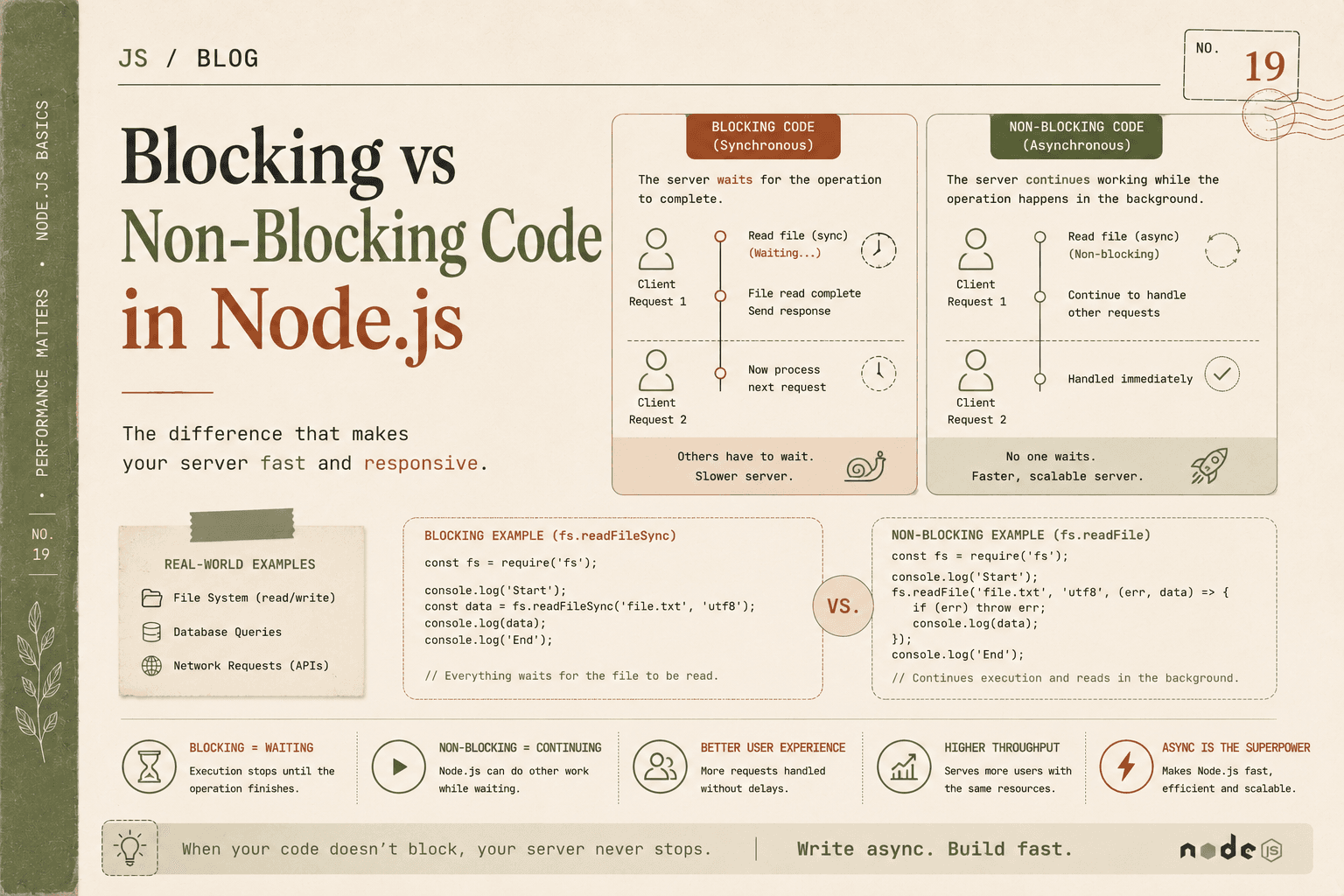
Blocking code is code that stops the program from moving forward until the current task is completely finished.
In simple words:
Blocking means wait here until the work is done.
If one operation takes a long time, everything after it must wait.
Simple Analogy: Waiting in Line
Imagine you go to a service counter.
There is only one employee.
You ask for a document that takes 5 minutes to prepare.
The employee does nothing else until your work is done.
Meanwhile, everyone behind you keeps waiting.
That is blocking behavior.
The system is forced to pause because one task is taking time.
Blocking in Programming Terms
In Node.js, blocking code prevents the event loop from doing other work.
This is dangerous because Node.js has one main JavaScript thread.
If that thread is blocked, other requests must wait.
So blocking does not just slow one request.
It can slow the whole server.
What Non-Blocking Code Means
Non-blocking code allows the program to start a task and continue doing other work before that task finishes.
In simple words:
Non-blocking means start this work, then move on, and handle the result later.
This is the design Node.js prefers.
Simple Analogy: Ordering at a Restaurant
Imagine a waiter takes your order and sends it to the kitchen.
The waiter does not stand in the kitchen doing nothing until your food is ready.
Instead:
The waiter takes your order
Sends it to the kitchen
Serves other customers
Returns when your food is ready
This is non-blocking behavior.
The system stays productive while waiting.
Why Blocking Slows Servers
Node.js is single-threaded for JavaScript execution.
That means:
One call stack
One main thread
One event loop managing tasks
If blocking code runs, that main thread becomes busy and unavailable.
As a result:
New requests cannot be processed quickly
Existing requests wait longer
The server feels slow under load
Scalability drops
This is why blocking code is so harmful in server-side development.
A File Reading Scenario
Let us compare blocking and non-blocking code using file handling, because it shows the difference clearly.
Blocking File Read
const fs = require("fs");

console.log("Start");

const data = fs.readFileSync("example.txt", "utf8");
console.log(data);

console.log("End");
What Happens Here
Step by step:
"Start"prints.readFileSyncstarts reading the file.Node.js stops at this line and waits.
Nothing else can happen until the file is fully read.
After the file is read, the contents are printed.
"End"prints.
If the file is large or disk access is slow, the entire server is blocked during that time.
This is blocking code because readFileSync() is synchronous.
Non-Blocking File Read
const fs = require("fs");

console.log("Start");

fs.readFile("example.txt", "utf8", (err, data) => {
  if (err) {
    console.error(err);
    return;
  }

  console.log(data);
});

console.log("End");
What Happens Here
Step by step:
"Start"prints.readFilebegins reading the file in the background.Node.js does not wait.
"End"prints immediately.When the file is ready, the callback runs.
The file contents are printed.
This is non-blocking because Node.js continues execution while the file is being read.
Output Comparison
Blocking Version Output
Start
[file contents]
End
Non-Blocking Version Output
Start
End
[file contents]
This output difference is the clearest sign of blocking vs non-blocking behavior.
Why This Matters for Server Performance
Imagine a server handling 100 requests.
Each request needs to read a file.
In Blocking Style
Request 1 reads file and blocks
Request 2 waits
Request 3 waits
Request 4 waits
Requests pile up.
Even if the server is powerful, the single JavaScript thread becomes a bottleneck.
In Non-Blocking Style
Request 1 starts file read
Request 2 starts file read
Request 3 starts file read
Node.js continues handling requests
Results are processed when ready
Now the server can serve many users much more efficiently.
That is why Node.js depends heavily on non-blocking design.
Async Operations in Node.js
Most time-consuming operations in Node.js are designed to be asynchronous and non-blocking.
Examples include:
File reading and writing
Database queries
API requests
Timers
Network communication
When these operations are started, Node.js usually:
Hands the task off to the system or background worker
Continues running other code
Handles the result later through a callback, Promise, or async/await
This is the heart of Node.js performance.
Real-World Example: Database Calls
Suppose your server must fetch user data from a database.
Blocking Style Conceptually
const user = database.getUserSync(1);
console.log(user);
If this were blocking:
Node.js waits for the database
During that waiting period, no other requests are processed efficiently
That is bad for concurrency.
Non-Blocking Style Conceptually
database.getUser(1, (user) => {
  console.log(user);
});
Now:
The request is sent to the database
Node.js continues processing other work
When data returns, the callback handles it
This is far more scalable.
The Real Performance Impact
Blocking code hurts performance because it wastes the most valuable part of Node.js:
The event loop
The main thread
The ability to serve multiple requests concurrently
Non-blocking code improves performance because it keeps the server busy doing useful work instead of waiting.
This does not mean the actual file or database becomes faster.
It means the server handles waiting more intelligently.
That is a very important distinction.
Concurrency, Not Magic
Node.js does not make slow operations disappear.
If a database takes 2 seconds, it still takes 2 seconds.
The difference is:
Blocking code waits uselessly for 2 seconds
Non-blocking code uses those 2 seconds to handle other requests
That is why Node.js scales well for I/O-heavy applications.
Common Blocking Mistake in Node.js
Beginners often use synchronous file methods like:
readFileSyncwriteFileSync
These are okay for:
Small scripts
Setup code
Development utilities
But in real servers, they can become dangerous because they block the event loop.
In request handlers, asynchronous methods are usually the better choice.
Simple Mental Model
Think of it this way:
Blocking:
Start task
Wait
Continue later
Non-blocking:
Start task
Continue immediately
Handle result when ready
That one difference changes how scalable your server can become.
Summary
Blocking code stops execution until a task is complete. In Node.js, this is harmful because the main thread becomes unavailable, delaying other requests and reducing server performance.
Non-blocking code starts a task and continues execution immediately, allowing Node.js to handle other work while waiting for slow operations like file access or database responses.
This is why Node.js is built around asynchronous, non-blocking APIs. They make it possible for one thread to manage many requests efficiently, which is a core reason Node.js performs so well for web servers and real-time applications.