Creating Routes and Handling Requests with Express
When working with Node.js directly, building a web server using the built-in http module is possible, but it quickly becomes repetitive and harder to manage as your application grows.
This is where Express.js comes in.
Express simplifies server development by providing a clean and structured way to handle routes, requests, and responses.
Let us build this step by step.
What Express.js Is
Express.js is a lightweight web framework for Node.js.
It helps you:
Create servers easily
Define routes clearly
Handle different HTTP methods
Send responses in a clean way
Manage middleware
Important to understand:
Node.js gives you the foundation.
Express builds on top of Node to make development easier.
Why Express Simplifies Node.js Development
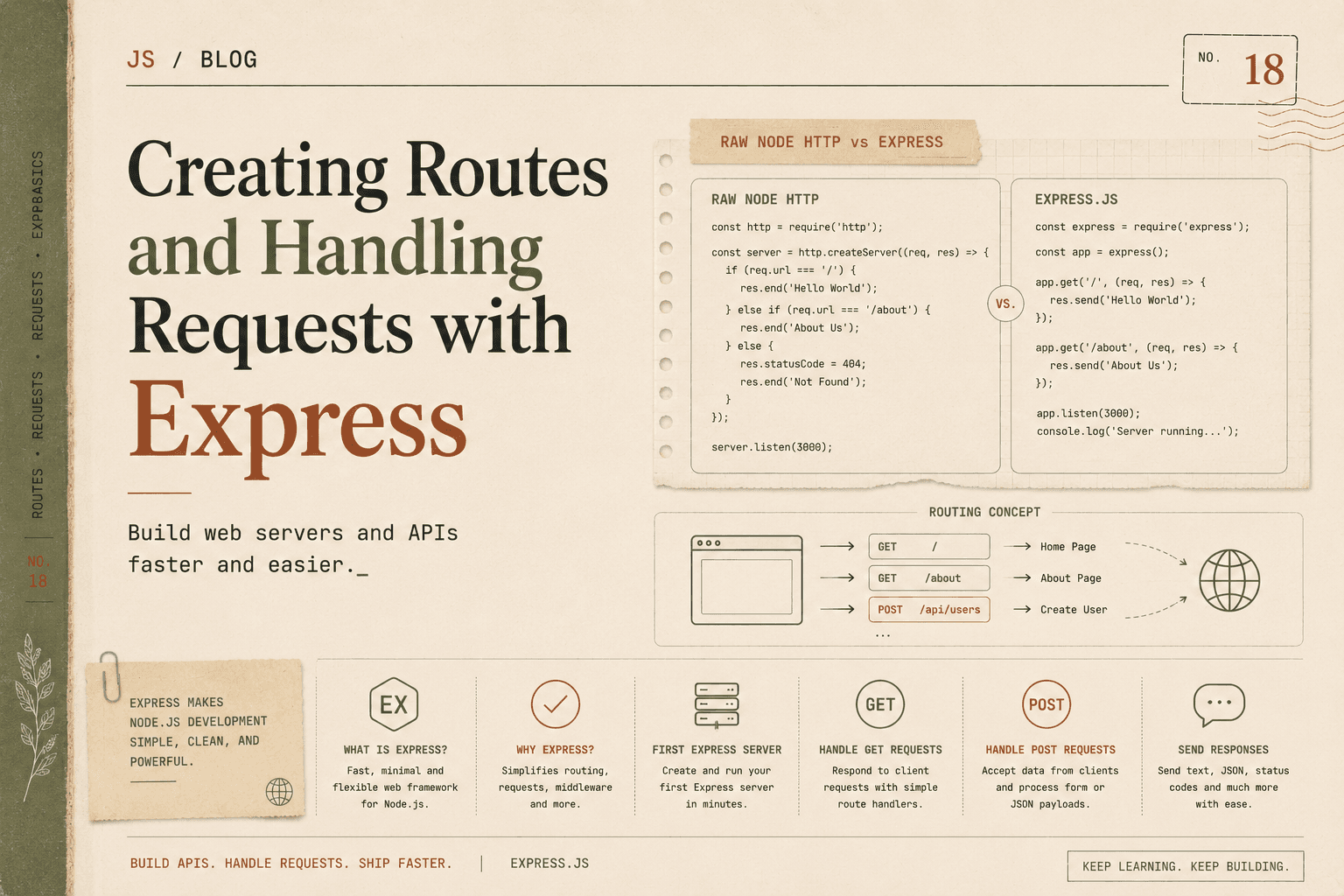
Let us compare a raw Node HTTP server with Express.
Raw Node HTTP Server
const http = require("http");

const server = http.createServer((req, res) => {
  if (req.url === "/" && req.method === "GET") {
    res.writeHead(200, { "Content-Type": "text/plain" });
    res.end("Home Page");
  } else if (req.url === "/about" && req.method === "GET") {
    res.writeHead(200, { "Content-Type": "text/plain" });
    res.end("About Page");
  } else {
    res.writeHead(404);
    res.end("Not Found");
  }
});

server.listen(3000);
Problems with this approach:
You manually check
req.urlYou manually check
req.methodRouting logic becomes messy as the app grows
Harder to scale
Now compare with Express.
Express Server
const express = require("express");
const app = express();

app.get("/", (req, res) => {
  res.send("Home Page");
});

app.get("/about", (req, res) => {
  res.send("About Page");
});

app.listen(3000, () => {
  console.log("Server running on port 3000");
});
Much cleaner.
No manual URL checking.
No manual method checking.
Routing is clearly defined.
That is the main benefit of Express.
Installing Express
Before using Express, you must install it.
Inside your project folder:
npm init -y
This creates a package.json file.
Now install Express:
npm install express
Express is now added to your project.
Creating Your First Express Server
Create a file named:
server.js
Add this code:
const express = require("express");
const app = express();

app.listen(3000, () => {
  console.log("Server running at http://localhost:3000");
});
Run it:
node server.js
Your Express server is now running.
Understanding Routing in Express
Routing means defining how your application responds to client requests.
Each route includes:
An HTTP method (GET, POST, etc.)
A URL path
A callback function
Basic structure:
app.METHOD(PATH, HANDLER);
Handling GET Requests
GET requests are used to retrieve data.
Example:
app.get("/", (req, res) => {
  res.send("Welcome to the Home Page");
});
When someone visits:
http://localhost:3000/
The server responds with:
Welcome to the Home Page
Multiple GET Routes
app.get("/about", (req, res) => {
  res.send("About Page");
});

app.get("/contact", (req, res) => {
  res.send("Contact Page");
});
Each route is clearly separated.
This is much cleaner than nested if statements in raw Node.
Handling POST Requests
POST requests are used to send data to the server.
Before handling POST data, add this middleware:
app.use(express.json());
This allows Express to parse JSON request bodies.
Now create a POST route:
app.post("/submit", (req, res) => {
  const data = req.body;
  res.send("Data received: " + JSON.stringify(data));
});
Now if you send a POST request with JSON data:
{
  "name": "Alice"
}
The server will respond with:
Data received: {"name":"Alice"}
Understanding req and res Objects
Every route handler receives two important objects:
(req, res)
req(request) contains:URL
Method
Headers
Body
Query parameters
res(response) allows you to:Send data
Set status codes
Send JSON
End the request
Sending Different Types of Responses
Sending Text
res.send("Hello World");
Sending JSON
res.json({ message: "Success" });
This automatically sets content type to JSON.
Sending Status Codes
res.status(404).send("Page not found");
Status codes communicate request results.
Clear Comparison: Raw Node vs Express
| Feature | Raw Node | Express |
|---|---|---|
| Routing | Manual checks | Built-in routing methods |
| Readability | More boilerplate | Cleaner and minimal |
| JSON Handling | Manual parsing | Built-in middleware |
| Scalability | Harder to manage | Easier to structure |
Express reduces repetitive code and makes routing straightforward.
Complete Minimal Example
Here is a small but complete Express server:
const express = require("express");
const app = express();

app.use(express.json());

app.get("/", (req, res) => {
  res.send("Home Page");
});

app.get("/about", (req, res) => {
  res.send("About Page");
});

app.post("/data", (req, res) => {
  res.json({
    message: "Data received",
    data: req.body
  });
});

app.listen(3000, () => {
  console.log("Server running at http://localhost:3000");
});
This handles:
GET /
GET /about
POST /data
Clean, readable, and structured.
Why Routing Matters
As applications grow, you may have:
20 routes
50 routes
100+ routes
Without a framework like Express:
Code becomes messy
Hard to maintain
Hard to debug
Express provides a clean structure for handling routes and requests.
Key Takeaways
Express:
Is a lightweight Node.js framework
Simplifies server creation
Makes routing clear and readable
Handles GET and POST easily
Reduces boilerplate code
Improves maintainability
It builds on Node’s core capabilities but makes development much faster and cleaner.
Conclusion
Express.js simplifies Node.js development by providing an easy-to-use framework for routing and request handling. Compared to the raw HTTP module, Express offers cleaner syntax, built-in routing methods, and simplified response handling.
By using app.get() and app.post(), developers can define routes clearly without manually checking URLs and request methods. This structured approach makes applications easier to read, maintain, and scale.
Express allows you to focus on building features instead of managing low-level server logic, making it one of the most popular frameworks in the Node.js ecosystem.