How Node.js Handles Multiple Requests with a Single Thread
One of the most common questions about Node.js is:
If Node.js is single-threaded, how can it handle thousands of requests at the same time?
At first glance, this sounds impossible.
If there is only one thread, should it not handle only one request at a time?
The answer lies in understanding:
What single-threaded really means
How concurrency differs from parallelism
How the event loop works
How Node delegates slow tasks
Let us break this down clearly and step by step.
Understanding Threads vs Processes (Simple Explanation)
Before diving into Node.js, we need a basic understanding of threads and processes.
A process is an independent running program.
For example, your browser is one process, your text editor is another.
A thread is a smaller unit of execution inside a process.
A process can have multiple threads working at the same time.
Traditional servers often:
Use multiple threads
Assign one thread per request
Handle many requests in parallel
Node.js, however:
Uses one main thread
Does not create a new thread per request
That sounds limiting, but it is actually efficient for many web applications.
The Single-Threaded Nature of Node.js
Node.js runs JavaScript code in a single main thread.
This means:
Only one JavaScript function executes at a time.
There is only one call stack.
There are no multiple JS threads competing.
But this does not mean Node.js can handle only one request at a time.
The key idea is this:
Node.js is single-threaded for JavaScript execution, but not single-tasked.
It handles multiple operations concurrently using non-blocking I/O.
Concurrency vs Parallelism (Important Distinction)
Parallelism means:
- Multiple tasks execute at the same time on multiple CPU cores.
Concurrency means:
Multiple tasks are in progress.
The system switches between tasks efficiently.
Tasks do not block each other unnecessarily.
Node.js focuses on concurrency.
It does not run multiple JS functions at the exact same time.
Instead, it manages many tasks without blocking.
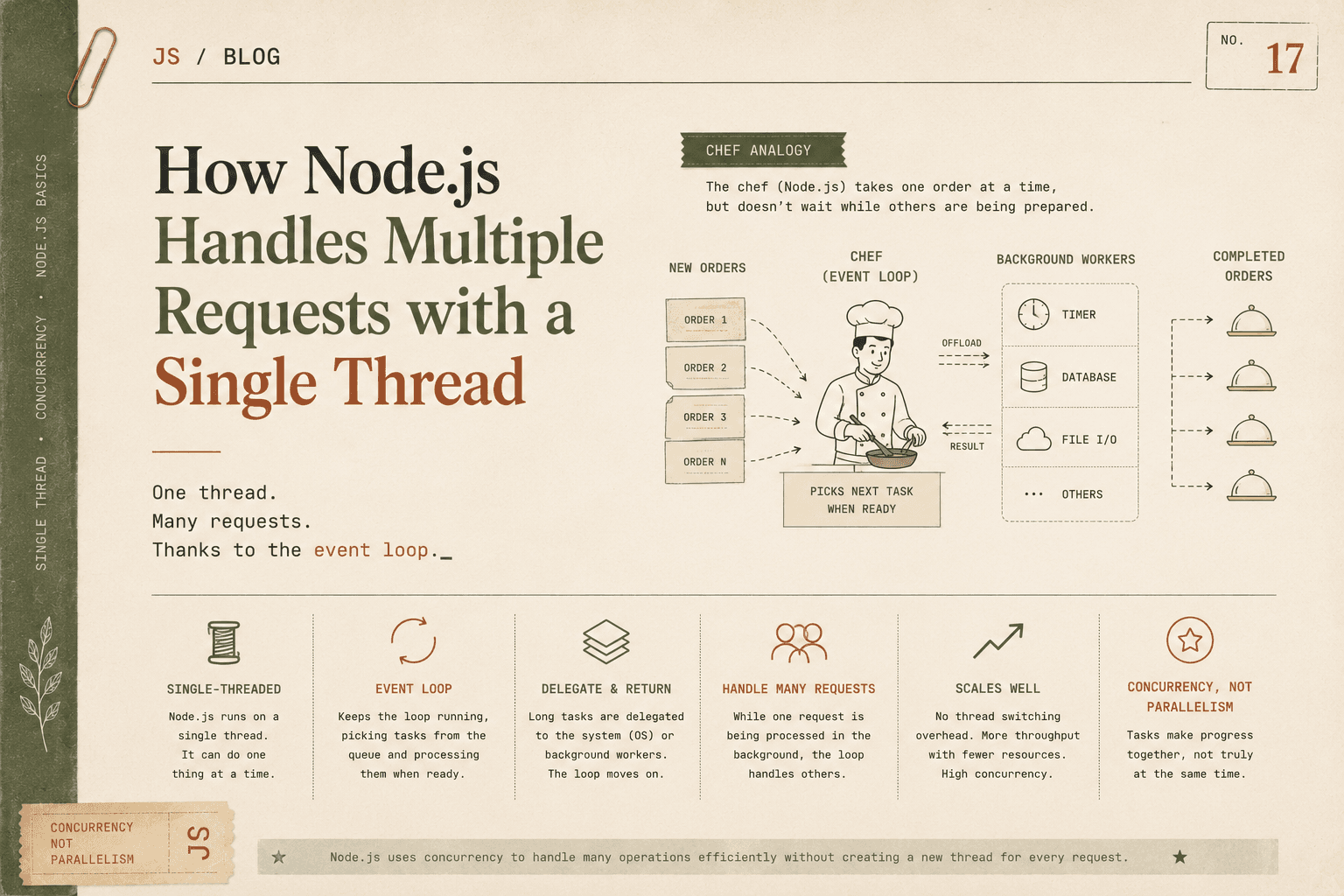
The Chef Handling Orders Analogy
Imagine a restaurant kitchen with:
One chef
Many customer orders
Traditional multi-threaded server:
Each customer gets their own chef.
Many chefs cook in parallel.
Node.js:
One highly efficient chef.
When an order requires baking (which takes time), the chef:
Puts it in the oven.
Moves to prepare another order.
When the oven timer rings, the chef serves the dish.
The chef is not standing idle waiting for food to cook.
The oven represents background workers (like the OS handling file or network operations).
The chef represents the event loop.
This is how Node.js handles many requests efficiently.
How Node.js Handles Multiple Client Requests
Let us walk through what happens when multiple users hit a Node.js server.
Imagine 3 users send requests at nearly the same time.
Step 1: Requests Arrive
Node receives:
Request A
Request B
Request C
They enter the event system.
Step 2: Handling Request A
Suppose Request A needs to:
- Query a database
Node:
Sends the database query to the system.
Registers a callback.
Moves on immediately.
It does not wait for the database to respond.
Step 3: Handling Request B
Now Node processes Request B.
Suppose it needs to:
- Read a file
Node:
Delegates file reading to the system.
Registers a callback.
Moves on.
Still no waiting.
Step 4: Handling Request C
Suppose Request C just needs:
- Some quick calculation
Node executes it immediately and sends a response.
Because JavaScript execution is fast for small tasks, it completes instantly.
Step 5: Background Workers Finish
Now:
The database responds for Request A.
The file read completes for Request B.
Their callbacks are placed in the task queue.
The event loop sees the call stack is free and processes them one by one.
All three requests are handled efficiently.
Delegating Tasks to Background Workers
Node.js itself runs JavaScript in one thread.
However, when it comes to slow operations like:
File system access
Network requests
Database calls
DNS lookups
Node delegates these tasks to:
The operating system
Background worker threads (managed internally)
These tasks run outside the main JS thread.
Once completed, the result is sent back to the event loop.
The main thread remains free to handle new incoming requests.
This delegation is the key to scalability.
What Would Happen in a Blocking System
If Node.js were blocking, the process would look like this:
Receive Request A.
Wait for database.
Do nothing until it finishes.
Then handle Request B.
During waiting time, the server would be idle.
That wastes resources and reduces scalability.
Node avoids this waste.
Why Node.js Scales Well
Node.js scales well because:
It avoids thread creation overhead.
It uses minimal memory compared to multi-threaded models.
It handles I/O operations efficiently.
It remains responsive under high concurrency.
In traditional multi-threaded systems:
Each thread consumes memory.
More users mean more threads.
More threads mean more context switching.
Context switching is expensive.
Node avoids that by using a single-threaded event loop.
Example: Simple HTTP Server Under Load
Imagine this server:
const http = require("http");

http.createServer((req, res) => {
  setTimeout(() => {
    res.end("Response after delay");
  }, 2000);
}).listen(3000);
If 100 users send requests:
Node schedules 100 timers.
The event loop continues running.
After 2 seconds, callbacks are executed one by one.
Node does not create 100 threads.
It manages 100 delayed responses efficiently using its event system.
When Node.js Performs Best
Node.js performs best in applications that:
Handle many simultaneous connections
Rely heavily on I/O
Need real-time updates
Use WebSockets or streaming
Examples:
Chat applications
Online games
API servers
Streaming platforms
Microservices
Because most web applications spend time waiting for I/O, Node’s non-blocking model works extremely well.
When It Might Not Be Ideal
Node.js is not ideal for:
Heavy CPU computations
Image processing
Complex scientific calculations
CPU-heavy tasks block the single thread and delay other requests.
For those workloads, multi-threaded or multi-process solutions are better.
Key Takeaways
Node.js:
Is single-threaded for JavaScript execution
Uses an event loop to manage tasks
Delegates slow operations to background systems
Focuses on concurrency, not parallelism
Avoids thread overhead
Scales well for I/O-heavy applications
The chef does not cook everything at once.
The chef organizes work efficiently.
That efficiency is what makes Node.js powerful.
Conclusion
Node.js handles multiple requests with a single thread by using a non-blocking, event-driven architecture. Instead of waiting for slow operations to finish, it delegates them to background workers and continues processing new requests.
Through the event loop, Node.js efficiently manages callbacks and ensures that the main thread remains responsive. It achieves concurrency without relying on multiple threads, which reduces overhead and improves scalability.
This design makes Node.js especially well-suited for high-concurrency, I/O-heavy web applications where responsiveness and efficiency are critical.