REST API Design Made Simple with Express.js
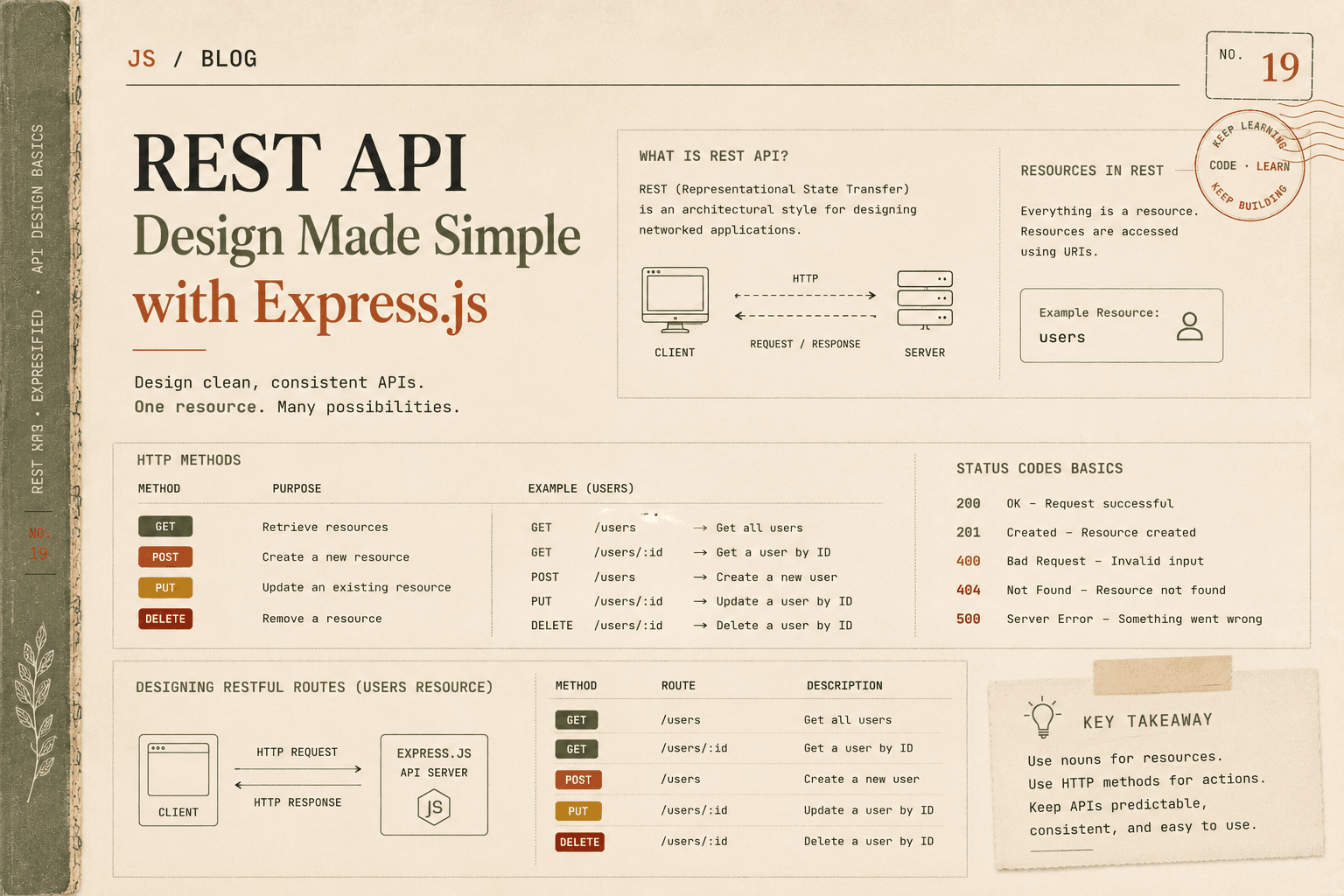
When building modern web applications, the frontend and backend usually communicate through something called an API.
An API acts as a bridge between:
The client (browser, mobile app, frontend)
The server (Node.js + Express + database)
Instead of rendering HTML directly, the server sends data, often in JSON format.
To make this communication structured and predictable, developers follow a design style called REST.
Let us understand it clearly and practically.
What a REST API Means
REST stands for:
Representational State Transfer
Do not worry about the formal definition.
In simple terms:
A REST API is a way to design server endpoints so that:
Each URL represents a resource
HTTP methods define actions on that resource
Responses follow consistent rules
It creates a standard way for clients and servers to communicate.
Understanding APIs as Communication
Imagine a mobile app wants to display a list of users.
The flow looks like this:
The app sends a request to the server.
The server processes it.
The server responds with JSON data.
The app displays the data.
The client does not need to know how the server works internally.
It only needs to know:
The endpoint
The method
The expected response
This contract is the API.
Resources in REST Architecture
In REST, everything revolves around resources.
A resource is a noun.
It represents something in your system.
Examples:
users
products
orders
posts
comments
Notice something important:
REST focuses on nouns, not verbs.
Instead of:
/getUsers
/createUser
/deleteUser
We use:
/users
And let HTTP methods define the action.
HTTP Methods in REST
REST APIs use standard HTTP methods to define actions.
The most common ones:
GET → Retrieve data
POST → Create data
PUT → Update data
DELETE → Remove data
Let us understand each clearly.
GET – Retrieve Data
Used when you want to fetch information.
Examples:
Get all users
Get a specific user
Route examples:
GET /users
GET /users/1
POST – Create Data
Used when creating new data.
Example:
POST /users
You send user data in the request body.
PUT – Update Data
Used to update existing data.
Example:
PUT /users/1
You update user with ID 1.
DELETE – Remove Data
Used to delete a resource.
Example:
DELETE /users/1
Deletes user with ID 1.
Status Codes Basics
HTTP status codes tell the client what happened.
Common ones:
200 → OK
201 → Created
400 → Bad Request
404 → Not Found
500 → Server Error
Example:
If user is created successfully:
res.status(201).json(newUser);
If user is not found:
res.status(404).json({ message: "User not found" });
Status codes help clients understand the result without guessing.
Designing REST Routes Using Users Example
Let us design a simple REST API for users.
We will use one resource:
users
Step 1: Create Express Server
const express = require("express");
const app = express();

app.use(express.json());

let users = [];
let idCounter = 1;
We use an array to simulate a database.
Step 2: GET All Users
app.get("/users", (req, res) => {
  res.status(200).json(users);
});
This retrieves all users.
Step 3: GET Single User
app.get("/users/:id", (req, res) => {
  const user = users.find(u => u.id === parseInt(req.params.id));

  if (!user) {
    return res.status(404).json({ message: "User not found" });
  }

  res.status(200).json(user);
});
This retrieves a specific user.
Step 4: POST Create User
app.post("/users", (req, res) => {
  const newUser = {
    id: idCounter++,
    name: req.body.name
  };

  users.push(newUser);

  res.status(201).json(newUser);
});
This creates a new user.
Notice:
We return 201 status.
We return the created user.
Step 5: PUT Update User
app.put("/users/:id", (req, res) => {
  const user = users.find(u => u.id === parseInt(req.params.id));

  if (!user) {
    return res.status(404).json({ message: "User not found" });
  }

  user.name = req.body.name;

  res.status(200).json(user);
});
This updates a user.
Step 6: DELETE User
app.delete("/users/:id", (req, res) => {
  const index = users.findIndex(u => u.id === parseInt(req.params.id));

  if (index === -1) {
    return res.status(404).json({ message: "User not found" });
  }

  users.splice(index, 1);

  res.status(200).json({ message: "User deleted" });
});
This removes a user.
Start Server
app.listen(3000, () => {
  console.log("Server running at http://localhost:3000");
});
Clean Route Naming Principles
Good REST design:
Uses nouns
Avoids verbs in URLs
Keeps structure consistent
Good:
GET /users
POST /users
GET /users/1
PUT /users/1
DELETE /users/1
Bad:
GET /getUsers
POST /createUser
DELETE /removeUser
Let HTTP methods define the action.
Why REST Design Matters
REST provides:
Predictable structure
Standardized communication
Easy frontend-backend integration
Cleaner documentation
Better scalability
When every developer follows REST principles, APIs become easier to understand and maintain.
Summary
A REST API is a structured way for clients and servers to communicate using HTTP methods and resource-based URLs.
Key principles:
Use nouns as resources
Use HTTP methods to define actions
Return proper status codes
Keep route naming clean and consistent
Using Express.js, building REST APIs becomes simple and readable. By focusing on resources like users, and clearly mapping GET, POST, PUT, and DELETE methods to actions, you create APIs that are easy to scale, maintain, and integrate with modern applications.