The Node.js Event Loop Explained
One of the most important concepts in Node.js is the event loop.
Understanding it explains why Node.js can handle thousands of requests efficiently even though it is single-threaded.
Before we define the event loop, we must first understand a limitation.
The Single-Thread Limitation
Node.js runs JavaScript in a single main thread.
This means:
It can execute only one piece of JavaScript at a time.
It does not create a new thread for every request like some traditional servers.
It does not run multiple JavaScript functions simultaneously in parallel.
At first glance, this seems like a disadvantage.
If Node.js can only do one thing at a time, how can it handle many users at once?
This is where the event loop becomes essential.
Why Node.js Needs an Event Loop
If Node.js were purely synchronous, it would behave like this:
Receive a request.
Perform a slow operation (like reading a file or querying a database).
Wait until it finishes.
Then move to the next request.
That would block the entire system.
Instead, Node.js uses asynchronous operations.
When it encounters something slow, it delegates that task and continues working on something else.
But if tasks are happening in the background, something must:
Track them.
Know when they finish.
Decide when to run their callbacks.
That "something" is the event loop.
What the Event Loop Is
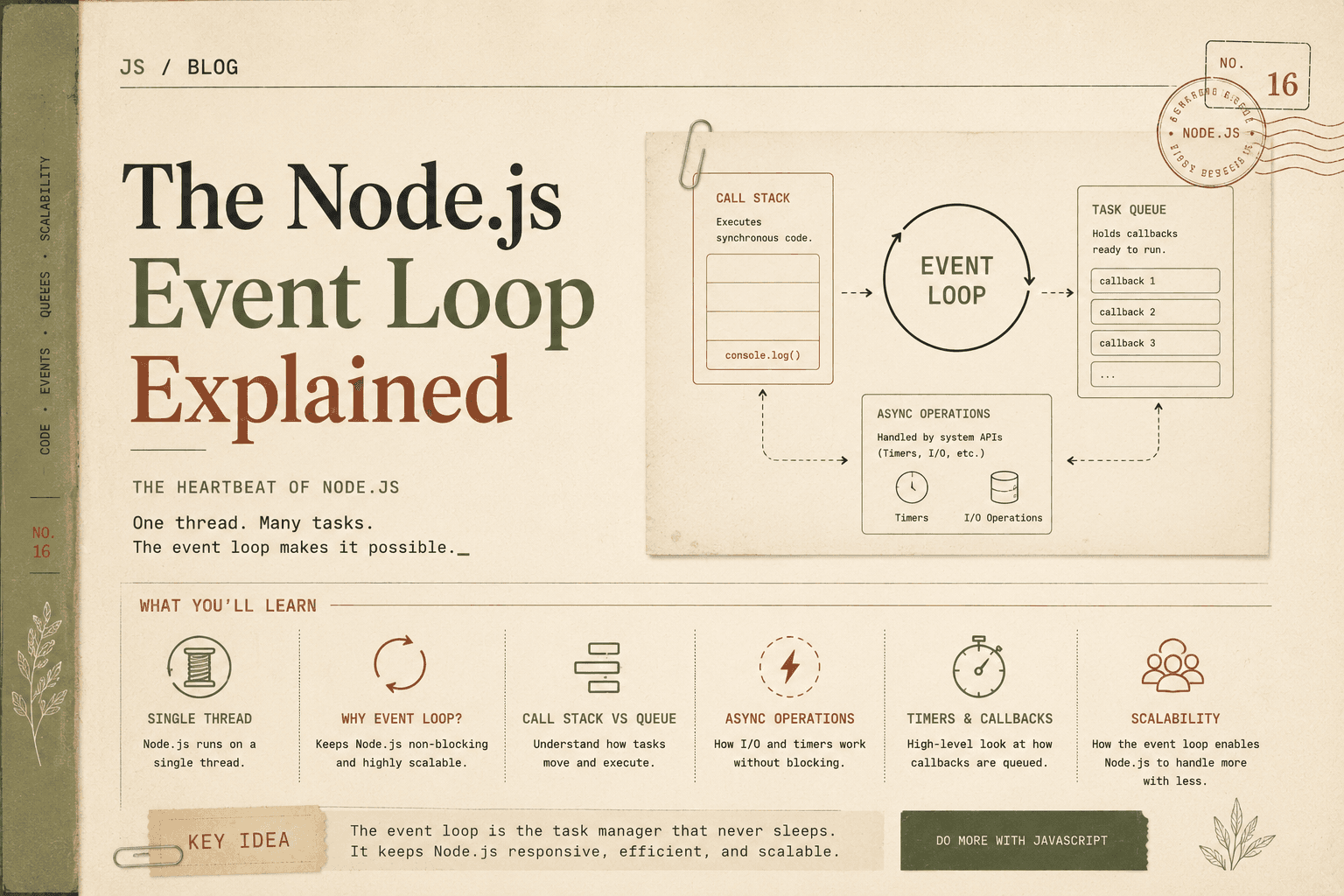
The event loop is a mechanism that continuously checks:
Is the main thread free?
Are there completed tasks waiting to be executed?
You can think of the event loop as a task manager for Node.js.
It ensures that:
Tasks are processed in the right order.
The single thread is never wasted.
Completed async operations are handled properly.
It runs continuously as long as the application is running.
Call Stack vs Task Queue (Conceptual Understanding)
To understand the event loop, we need to understand two important concepts:
Call Stack
Task Queue
We will keep this simple and conceptual.
The Call Stack
The call stack is where JavaScript executes code.
When you call a function:
It is placed on the stack.
It runs.
When finished, it is removed from the stack.
Example:
function greet() {
  console.log("Hello");
}

greet();
Execution:
greet()is pushed onto the stack.It runs.
It prints "Hello".
It is removed from the stack.
The stack can only execute one function at a time.
The Task Queue
The task queue holds callbacks from asynchronous operations.
Examples of async operations:
setTimeout
File reading
Network requests
Database queries
When these operations finish, their callbacks are placed into the task queue.
They do not immediately run.
They must wait until:
- The call stack is empty.
The event loop watches both the call stack and the task queue.
The Event Loop in Action (Simple Example)
console.log("Start");

setTimeout(() => {
  console.log("Timeout callback");
}, 0);

console.log("End");
What do you expect?
Output:
Start
End
Timeout callback
Step-by-step explanation:
"Start" runs synchronously.
setTimeoutregisters a timer and sends it to the background."End" runs immediately.
The call stack becomes empty.
The timer callback is placed in the task queue.
The event loop sees the stack is empty.
It moves the callback to the stack.
"Timeout callback" runs.
Even though the delay is 0, it still waits until synchronous code finishes.
This shows how the event loop manages execution order.
The Queue Analogy
Imagine a bank with:
One cashier (the single thread).
A queue of customers (task queue).
The cashier can serve only one customer at a time.
If a customer needs something complicated (like a loan approval):
The cashier sends the request to the back office.
The cashier continues serving other customers.
When the back office finishes, the result is placed in a waiting queue.
Once the cashier is free, they process the next waiting task.
The cashier never sits idle unless there are no tasks left.
That cashier is the event loop.
How Async Operations Are Handled
Let us look at a file reading example.
const fs = require("fs");

console.log("Start");

fs.readFile("example.txt", "utf8", (err, data) => {
  console.log("File read complete");
});

console.log("End");
Execution flow:
"Start" prints.
readFilesends file reading to the system.Node does not wait.
"End" prints.
When the file finishes reading, its callback is placed in the task queue.
The event loop moves it to the call stack when free.
"File read complete" prints.
This non-blocking delegation is key to Node’s performance.
Timers vs I/O Callbacks (High-Level Difference)
Both timers and I/O operations use the event loop, but conceptually:
Timers:
Trigger after a specific time delay.
Example:
setTimeout,setInterval.
I/O Callbacks:
Trigger when an external operation finishes.
Example: file reading, network response, database query.
Both eventually place their callbacks in the task queue.
The event loop ensures they run only when the call stack is empty.
Role of the Event Loop in Scalability
Scalability means:
Handling many users at once.
Without crashing.
Without excessive memory usage.
Traditional multi-threaded servers:
Create a new thread per request.
Threads consume memory.
Context switching adds overhead.
Node.js:
Uses one main thread.
Delegates slow operations.
Uses the event loop to manage callbacks.
Avoids thread creation overhead.
Because Node does not block while waiting, it can:
Accept new connections.
Handle thousands of concurrent requests.
Use fewer system resources.
This is why Node.js performs well for:
APIs
Real-time chat
Streaming services
Microservices
The event loop is the core reason behind this scalability.
Concurrency Without Parallelism
Node.js achieves concurrency.
Concurrency means:
Multiple tasks are in progress.
Even if not executing simultaneously.
Parallelism means:
- Multiple tasks run at exactly the same time on different CPU cores.
Node.js focuses on concurrency.
It manages many operations efficiently without needing many threads.
The event loop makes this possible.
Why Understanding the Event Loop Matters
If you misunderstand the event loop, you might:
Accidentally block the thread.
Write CPU-heavy code that freezes the server.
Misinterpret execution order.
Understanding it helps you:
Write efficient async code.
Avoid blocking operations.
Build scalable systems.
Predict execution behavior.
Conclusion
The Node.js event loop is the core mechanism that allows JavaScript to handle asynchronous operations efficiently despite being single-threaded.
It acts as a task manager that:
Monitors the call stack.
Watches the task queue.
Executes callbacks when the main thread is free.
By delegating slow operations and processing results later, Node.js avoids blocking and remains responsive under heavy load.
The event loop is what transforms a single-threaded system into a highly scalable and efficient runtime environment.