URL Parameters vs. Query Strings in Express.js
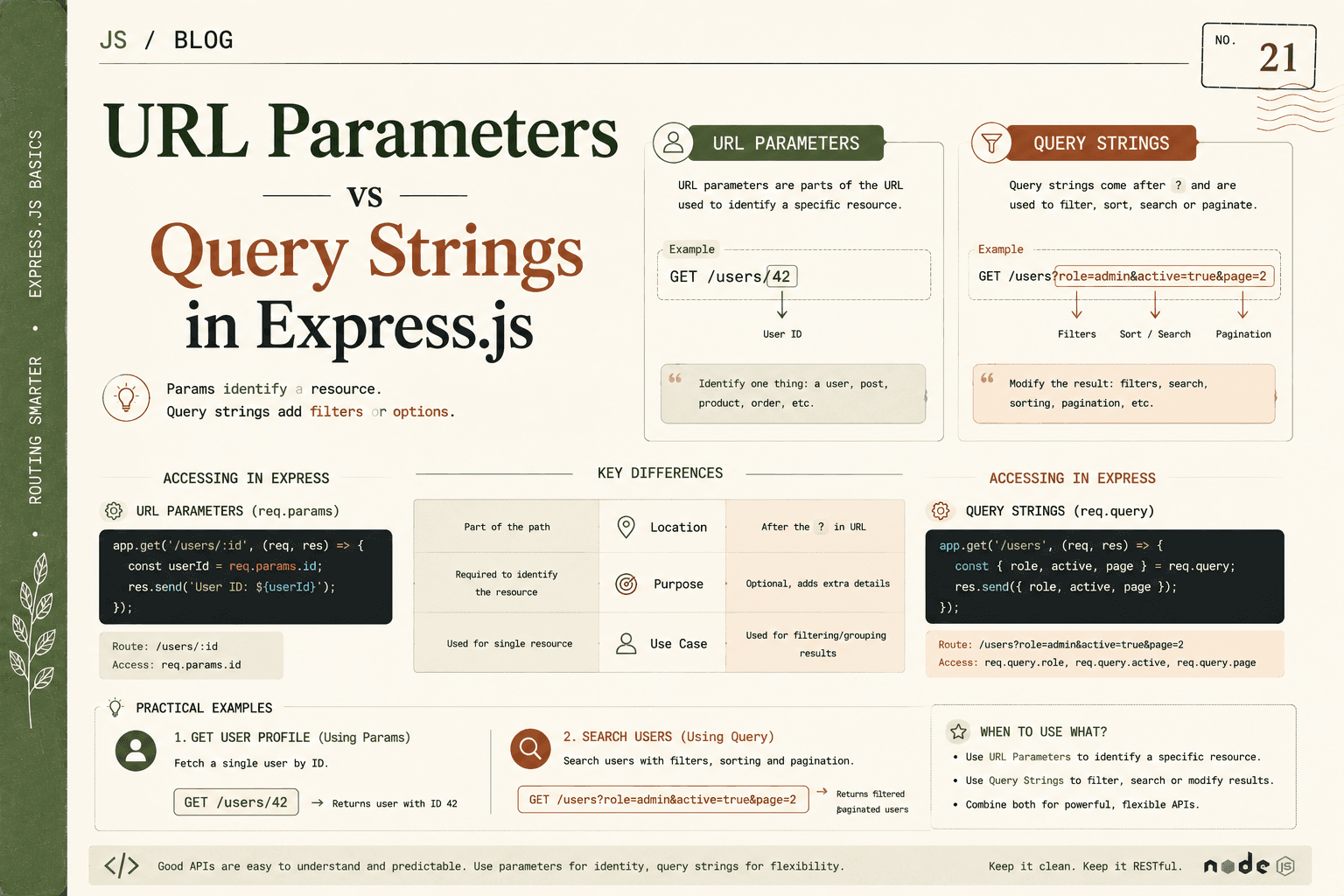
When building APIs and web applications with Express, two of the core ways you send client data through the URL are URL parameters (route parameters) and query strings. Though they both let you pass information to your server, they serve very different purposes, are accessed differently, and are ideal for distinct scenarios.
Understanding the when, why, and how of both will help you write clear, intuitive, and scalable routes in Express.
What Are URL Parameters?
URL parameters are dynamic "placeholders" in your URL path, often used to uniquely identify a specific piece of data (such as a record in your database). They’re called route parameters in Express documentation and are marked by a colon : in the route definition.
Think of URL params as variables in your route, which capture certain segments of the client’s requested URL to identify exactly which object or resource they want to interact with.
How URL Parameters Work: Breakdown
Let’s imagine an API that delivers user profile data.
Example URL:
GET /users/123
Here, 123 is not a static part of the route. It’s a variable that will change for each user.
Express route:
app.get('/users/:id', (req, res) => {
  // req.params.id is '123'
  // Fetch user with id 123 from database
  res.send(`User profile for id: ${req.params.id}`);
});
:idis a placeholder in the routeExpress assigns whatever segment appears in its place from the incoming request to
req.params.id
You can use multiple parameters:
Example: Nested Resources
GET /users/123/posts/42
app.get('/users/:userId/posts/:postId', (req, res) => {
  // req.params.userId is '123'
  // req.params.postId is '42'
});
This is useful for expressing relationships ("Get post 42 by user 123").
Use Cases for URL Parameters
Fetch, update, or delete a specific item:
/products/:productIdRefer to nested resources:
/users/:id/comments/:commentIdDirectly point to unique resources without ambiguity
Key Properties
Are required for the route to match (unless you specifically make them optional)
Are part of the route path (not after
?)Common practice is to use them for singular resources (not lists)
Typically only one value per parameter (no arrays)
What Are Query Strings?
Query strings are a set of key-value pairs added after a ? in your URL. They offer a flexible way to provide extra options, filters, or modifications alongside a main route.
They are typically used to control:
Filtering results (
?city=Paris)Sorting or ordering (
?sort=desc)Limiting/pagination (
?limit=10&page=2)Adding optional features without changing the underlying resource request
Anatomy of a Query String
Example URL:
GET /products?category=books&inStock=true&sort=price
Everything after
?is the query string.Each
key=valuepair is separated by&.Each key and value are strings (type conversion is up to you).
Express route:
app.get('/products', (req, res) => {
  const category = req.query.category;  // 'books'
  const inStock = req.query.inStock;    // 'true'
  const sort = req.query.sort;          // 'price'
  // Use these to filter/search your product results
});
Use Cases for Query Strings
Search and filter lists:
/users?role=adminPagination and sizing:
/items?limit=20&page=4Optional or advanced arguments:
/events?highlighted=true&sponsor=IBMSorting and other “modifier” features:
/posts?sort=-dateSupporting multiple filters at once (can include, omit, or reorder them freely)
Differences Between URL Params and Query Strings
Fundamental Difference:
URL params for identity
- Specify WHICH resource (user 42, post 14)
Query strings for options
- Specify HOW you want resources delivered (list of all, filtered, sorted, limited)
Technical Comparison:
| Feature | URL (Route) Params | Query Strings |
|---|---|---|
| Location | Path (e.g. /users/:id) |
After ? in URL |
| Example | /products/54 |
/products?category=games |
| Purpose | Resource identifier | Filtering/modifying collections |
| Required? | Yes, for route match | No, can be omitted/optional |
| Data Format | Always a string | Always a string (convert if needed) |
| Express Access | req.params |
req.query |
| RESTful Usage | Points to single item | Refines a list/collection |
Visual Example:
Accessing the same resource with and without filtering.
To get a specific user with ID 18 (IDENTIFIER):
GET /users/18
// req.params.id == '18'
To get all users whose role is "admin" (FILTER):
GET /users?role=admin
// req.query.role == 'admin'
Accessing Parameters in Express
1. Accessing URL Params (req.params)
Params are mapped by the names you specify, after the colon.
Values are always strings.
app.get('/posts/:postId', (req, res) => {
  const postId = req.params.postId;
  res.send(`Post ID requested: ${postId}`);
});
URL: /posts/42 will give req.params.postId === '42'.
2. Accessing Query Strings (req.query)
Query params are available as properties of
req.queryobject.If not sent, will be
undefined.
app.get('/articles', (req, res) => {
  const limit = req.query.limit;    // e.g. '10'
  const page = req.query.page;      // e.g. '2'
  res.send(`Listing page \({page} with limit \){limit || 10}`);
});
URL: /articles?page=2&limit=10 gives { page: '2', limit: '10' }
Multiple values for a key (e.g., /tags?tag=js&tag=node):
- Express will give
req.query.tagas an array:['js','node'].
When to Use URL Params vs. Query Strings
Here are some guiding rules:
Use URL Parameters (req.params) when:
Accessing a specific resource
ID or unique value is required to fetch, update, or delete something
The value is essential for the resource path
Example endpoints:
/users/7(Get user with ID 7)/products/5/reviews(Get reviews for product 5)/posts/77/comments/40(Get comment 40 for post 77)
RESTful principle: Use params for "pointing" to one logical thing.
Use Query Strings (req.query) when:
Refining a collection or list
Adding optional modifiers, sort order, or filters
Sending parameters that could be omitted or varied independently
Example endpoints:
/users?age=18&city=London/products?category=books&minPrice=20&maxPrice=100/posts?author=Alice&sort=-date&limit=20
RESTful principle: Use query strings for how you want the resource, not which one.
Combined Example: User Purchases
Suppose you want all orders for a specific user, but only completed ones:
GET /users/42/orders?status=completed
42(user ID) is a URL param: identifies whose orders.status=completedis a query string: refines the search to only completed orders.
Express code:
app.get('/users/:id/orders', (req, res) => {
  // Fetch orders for req.params.id
  // Optionally filter by req.query.status
});
More Practical Examples
Profiles:
/users/35→ Profile for user 35 (URL param)
Product Filtering:
/products?minPrice=20&maxPrice=50&category=home→ Find products filtered by price and category (query)
Pagination:
/posts?page=2&perPage=10→ Get the 2nd page of posts (query)
Nested resources:
/users/88/orders/133→ Specific order for user 88 (both params)
Search:
/search?query=node&sort=relevance(query)
Bulk actions:
/admin/users?active=false&sort=created(query)
RESTful Naming Tips
Keep URLs noun-based and hierarchical:
/users/:id/reviews/:reviewIdDon’t put action verbs in the path: Use methods (GET/POST/PUT/DELETE) to define actions, not path names.
Keep routes intuitive for both humans and code.
How Express Handles Both
Express automatically parses both params and query strings.
req.paramsis always an object with all named params (from/:paramsyntax).req.queryis always an object containing keys and values from the query string.You can use both at the same time (as shown above).
Troubleshooting and Type Handling
All values from URL and query will be strings by default (unless you convert them).
/users/7⇒req.params.idis'7', not number 7/products?minPrice=10⇒req.query.minPriceis'10'(convert withparseIntif needed)
Query parameters that are not included will be
undefined, so be sure to handle defaults.
Summary
URL parameters (
req.params) are used to uniquely identify specific resources in your API; they are required parts of a path, e.g./users/42.Query strings (
req.query) provide additional, optional key-value pairs after the path (after?), and are used for filtering, sorting, or modifying the results of a route—e.g./users?role=admin.Use URL parameters when your route needs to reference one specific entity or a hierarchical relationship.
Use query strings when you want to let users or clients filter, search, or modify their results.
Following these conventions helps keep your routes RESTful, expressive, and easy to understand—both for you and for anyone using your API.